
When does this feature appear?
The feature appears on the new question form only when the question type is one of the following:
| Question type in Moodle | Technical name |
|---|---|
| Multiple choice | multichoice |
| Short answer | shortanswer |
| True / False | truefalse |
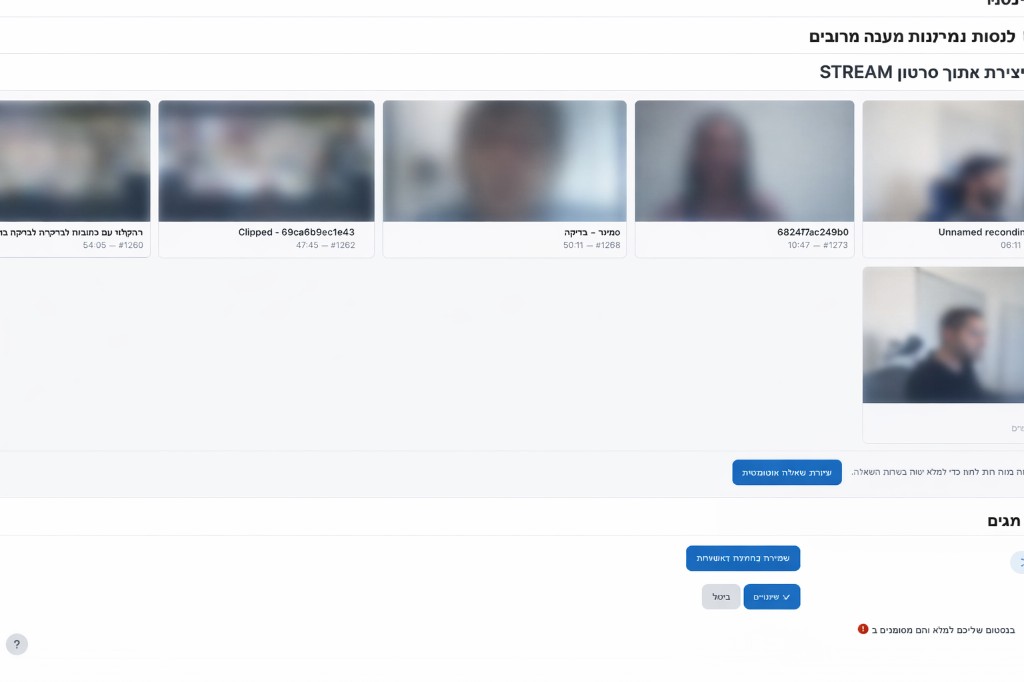
When you open one of these question types, the form gains a section titled «Create question from Stream video» (technical page ID: questionfromstreamheader) — with a video grid and a button for automatic generation.
Prerequisites
- Site settings: Stream URL and API key must be configured. If missing, a matching alert will appear.
- User profile: an email address is usually required in the profile so the system can load the video list from the service (as described in built-in error messages).
- Videos with subtitles: the list shows videos relevant to your Stream account/authentication, provided there is a basis for generating questions from subtitles.
Usage steps (for each supported question type)
- Create a new question and choose the desired question type from the three above.
- In the «Create question from Stream video» section — if there are many videos, you can paginate. Pagination uses the
ls_uvpageparameter in the URL. - Select a video from the list (clicking a card marks it as selected).
- Click «Create question automatically».
- The system calls the Stream server (with the matching question type) and opens the question form via redirect with fields pre-filled.
- Review and edit the wording, answers, and grades, then save the question as usual.
questionfromstreamselectvideo).
What is sent to the API by question type?
The Moodle plugin code maps the Moodle form type to the question_type parameter in the Stream call:
| Moodle form | question_type for API |
|---|---|
| Multiple choice | multichoice |
| Short answer | short_answer |
| True / False | true_false |
Additionally, videoid, count (currently 2 when clicking from JavaScript), and category / course / module parameters from the form are usually sent — according to plugin and form settings.
What each type expects from the API (briefly)
The Stream server returns a list of questions in JSON. The plugin verifies that items match the type selected in Moodle:
- Multiple choice: an item with
typematching a multiple-choice question (multiple_choice), including options and a correct answer — per Stream specification. - Short answer: a
short_answeritem with question text andanswer_key(additional answer sources are supported in plugin mapping). - True / False: a
true_falseitem withquestionand booleancorrect_answer(trueorfalse).
Additional notes
- Pre-fill link: the link is one-time and short-lived (session token based). If it expired or you tried to open an invalid link manually — return to video selection and generate again.
- Draft: after automatic fill, the question is saved as a draft that should be reviewed before final save.
- API aliases: when calling the Web Service directly you can also use aliases (e.g.
mc,short,tf) — the Moodle interface uses the normalized values above.
For the full endpoint structure and fields, see the developer documentation in webservice/video_subtitle_questions.php in the Stream project.